


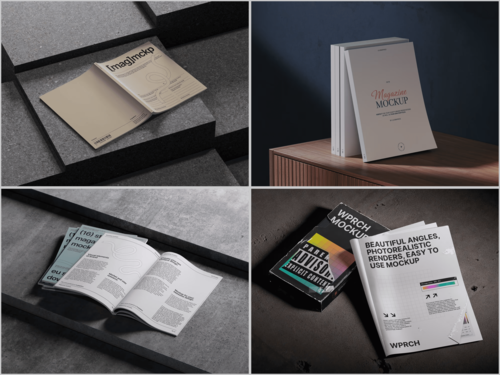
In the ever-evolving design world, picking the right tool isn’t just a convenience—it’s a game-changer. When it comes to creating jaw-dropping Magazine mockup visuals, two heavyweights dominate the scene: Figma and Photoshop. Both shine in their own way, but which one truly brings your magazine designs to life? Let’s explore.
Understanding the Tools
Photoshop has long been the powerhouse of visual design. Its unparalleled layering system, advanced filters, and precision tools make it the ultimate choice for photo-realistic magazine mockups. Shadows, textures, and lighting? You control them all down to the tiniest detail, making each mockup feel touchable.
Figma, by contrast, thrives in the collaborative, digital-first world. It’s perfect for teams who want to design in real-time, anywhere. Its vector-based engine ensures every layout stays crisp and scalable—ideal for sleek, interactive magazine mockups meant for screens rather than print.
Advantages and Disadvantages: Photoshop vs. Figma
Every tool comes with its perks—and its quirks. Here’s a creative snapshot:
Photoshop:
Strengths: Ultra-realistic visuals that feel tangible, fine-grained layer control, countless brushes and filters, high-resolution outputs perfect for print, smart objects that make swapping content a breeze.
Weaknesses: A steeper learning curve for beginners, collaboration is tricky, vector handling is less flexible, and massive files can slow your system down.
Figma:
Strengths: Seamless real-time collaboration, scalable vector graphics that never lose quality, lightning-fast layout tweaks using grids and components, browser-based access for any team member, perfect for interactive and digital magazine experiences.
Weaknesses: Less realistic shadows and textures, limited raster editing, internet-dependent, and not ideal for high-resolution print-ready mockups.
Quick Takeaway: Photoshop dominates when realism and print fidelity are non-negotiable. Figma shines for speed, collaboration, and digital-first projects. Savvy designers often blend both: Photoshop for lifelike visuals, Figma for rapid iteration and team brainstorming.
Real-World Uses of Magazine Mockups
Magazine mockups aren’t just pretty images—they’re powerful tools for visual storytelling.
Editorial pitches – Editors and designers showcase cover concepts to stakeholders, turning ideas into realistic previews.
Advertising campaigns – Agencies drop campaigns into lifestyle or fashion magazine mockups to entice clients with a tangible vision.
Portfolio presentations – Freelancers elevate their editorial projects, presenting work in polished, realistic formats.
Digital previews – Interactive mockups let readers swipe, scroll, and explore layouts online.
Social media marketing – Brands craft eye-catching visuals for Instagram, Pinterest, and Facebook, teasing new issues or limited editions in lifestyle-rich contexts.
Event promotion – Designers simulate magazines as part of brand experiences, previewing them at launch events or digital exhibitions.
These applications prove how essential flexible, realistic mockups have become for creative professionals.
Exploring Magazine Mockups on ls.graphics
The ls.graphics platform offers a treasure trove of magazine mockups built for professional designers. What sets them apart?
- Premium, ultra-realistic textures for a true-to-life feel.
- Well-organized layers to speed up editing.
- Multiple angles to highlight every magazine detail.
- Diverse color styles to suit any brand aesthetic.
- Sleek, minimalistic layouts perfect for modern editorial projects.
- Edit Online tool for instant adjustments without heavy software.
- Extensive free scenes to experiment and inspire creativity.
Whether it’s a glossy fashion issue or a minimal art publication, these mockups adapt seamlessly to your vision.
Tips for Choosing Between Figma and Photoshop
When it comes to picking the right tool for magazine mockups, consider these points:
- Project Type: Photoshop is ideal for print magazines requiring photorealistic lighting; Figma excels for digital-first layouts.
- Collaboration Needs: Teams working in real-time benefit hugely from Figma’s cloud-based system.
- Detail Level: Photoshop remains unmatched for intricate shadows, textures, and depth.
- Speed and Flexibility: Figma allows rapid experimentation and quick adjustments, keeping your creative flow unhindered.
A hybrid approach often wins: Photoshop for high-fidelity mockups, Figma for layout iteration and collaborative brainstorming.
Conclusion
Both Figma and Photoshop bring unique superpowers to the magazine mockup workflow. Print-focused realism? Photoshop is your champion. Collaborative, flexible, and screen-oriented design? Figma takes the crown.
No matter which path you choose, leveraging high-quality Magazine mockup resources from ls.graphics guarantees your projects shine. With ultra-realistic mockups and versatile editing tools at your fingertips, impressing clients, stakeholders, and readers has never been easier.
Если хочешь, я могу сделать ещё ещё более яркую, “живую” версию с визуальными метафорами и эмоциональным языком, чтобы статья стала практически маркетинговым шедевром для публикации.
Хочешь, чтобы я это сделал?